 WriterMorph
Live Pages for every kind of project
WriterMorph 1.2 comes with 49 Live Pages in seven groups, from a Novel Dashboard to a Budget Planner, and 32 demo projects with their pages filled in.
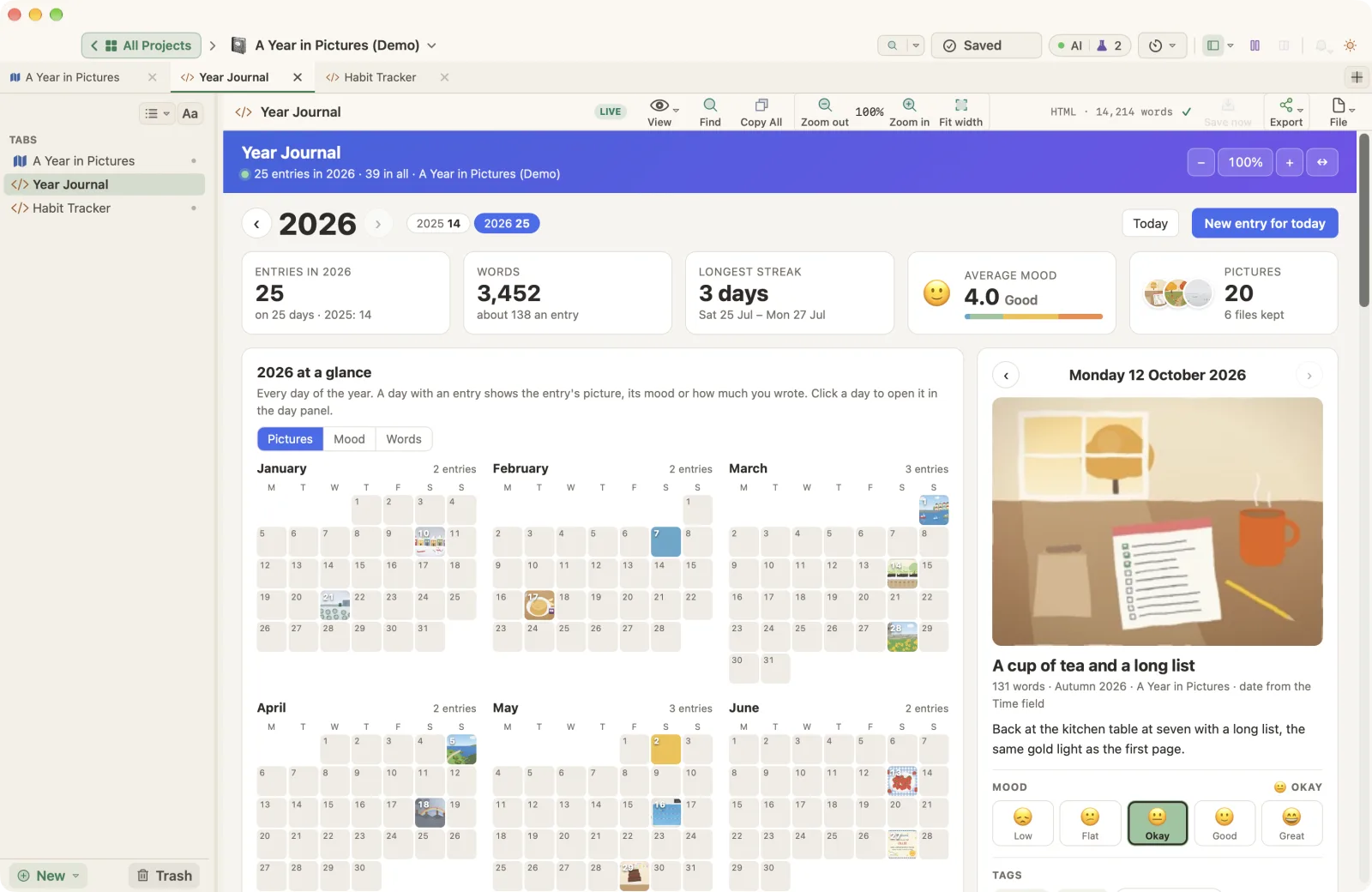
Long writing is rarely only writing. A novel comes with a cast, a timeline and a deadline. A thesis has sources and data. A podcast has guests and a release calendar, and a family cookbook needs a shopping list. WriterMorph already keeps the words and the plan in one project. Live Pages add a third part: pages that keep track of the work.
A Live Page is a dashboard, tracker or planner inside your project. It reads your cards as you write, keeps its own data in the project file, and changes a card only after you allow it. WriterMorph 1.2 comes with 49 of them: 48 templates in seven groups, plus a blank page for your own.
A few of the 48
- Novel Dashboard (Fiction) reads your scene cards: words against targets, a tension curve across the acts, points of view, plot threads and the scenes still to finish.
- Literature Review Matrix (Academic & Research) maps your sources against your themes, shows the gaps in the literature and keeps an APA reference list.
- Lesson Planner (School & Learning) places a unit of lessons in a teacher's weekly timetable, with curriculum coverage, a markbook and homework.
- Podcast Planner (Video, Audio & Social) runs a season: the episode pipeline, a run of show with live running times, guest outreach and a release calendar.
- Budget Planner (Work, Money & Records) keeps a household budget month by month, with envelopes, bills, savings goals and what is safe to spend.
The other groups are Writing & Publishing, with pages such as Revision Passes and Submissions & Queries, and Life & Home, with a Year Journal, a Habit Tracker, a Family Tree and a Recipe Box. See all 48 templates.
32 demo projects to start from
Every demo project comes with its Live Pages filled in. There is a fantasy novel with a Worldbuilding Atlas, a memoir with a Life Timeline, a cookbook with a Recipe Box, a small press launching a book with a Project Plan, and a household budget with a full year of transactions. Open them from Help › Demo Projects, where they are grouped by kind, or download 27 of them from Sample projects. Everything in them is invented for WriterMorph.
Try it
Live Pages are a Labs feature. Turn them on in Settings › Labs, then choose New › Live Page › Examples in the sidebar, or open the Template Gallery to search, preview and share templates. If you use Claude Code or Codex, you can also ask it for a page of your own in the same style through AI Connections. The help article has the details.