 WriterMorph

How to plot a romance novel: the beats readers expect, planned in WriterMorph
Two leads with arcs of their own, a conflict that keeps them apart, the beats from meet-cute to happy ending and a slow burn paced on purpose. Then the same plan in WriterMorph's Romance Novel template.
A romance makes the reader a promise before the first page: the two people at its center will end up together. The reader knows where the story is going. The plot's job is to make the road there hard enough that the ending feels earned.
The promise of a happy ending
The genre's one firm convention is the ending. Romance readers call it the HEA, happily ever after, or the HFN, happy for now: the couple together, with a future the reader can believe in. A love story that ends with the lovers apart can be a fine book, but most romance readers won't call it a romance.
Because the outcome is known, the suspense lies in how, not whether.
Two leads, two arcs
Most novels have one protagonist who carries the change. A romance has two, and the relationship is the plot. Give each lead:
- a want: what they think they are after, usually not love;
- a need: what they must learn before they can love, such as letting someone in;
- a wound or flaw: the old hurt that keeps them guarded.
The pairing works best when each lead presses on the other's flaw: a guarded lead meets someone who won't stay at arm's length. Both should change, visibly, by the end. See protagonist, antagonist and conflict for more on wants, needs and flaws.
What keeps them apart
The leads need a reason they can't simply get together in chapter two, and it usually comes in two layers.
| Conflict | Examples | What resolves it |
|---|---|---|
| External | Rival jobs, family, distance, a secret, a deadline | Circumstances change, or the leads act |
| Internal | A wound, a belief about love, a fear of being known | Only the character changing |
External conflict supplies the events; internal conflict gives them meaning, and it should be the harder one to beat. A breakup that one honest conversation would fix tends to frustrate readers. A breakup that grows out of both leads' flaws feels inevitable, and its repair feels earned.
The beats readers expect
Romance has familiar moves. The order can bend, but readers notice a missing one.
- The meet-cute. A first meeting charged with attraction and friction at once, specific to these two people.
- Resistance. Each lead has reasons this is a bad idea.
- Forced proximity. Something keeps them together: a shared project, a fake relationship, a road trip, one house. Many favorite tropes work this way.
- Rising attraction. Banter, near misses, a glimpse behind the armor.
- The first kiss or a midpoint commitment. It feels like victory, but it is a false high: the real obstacle hasn't been faced.
- Doubts return. Outside pressure grows, and closeness sets off each lead's wound.
- The breakup, or dark moment. The relationship breaks because of who they are.
- Apart. Alone, each lead sees what has to change.
- The grand gesture. A costly, vulnerable act that proves the change, not just a speech.
- The ending. The HEA or HFN, often mirroring the opening.
These moves fit the fifteen beats of Blake Snyder's Save the Cat! beat sheet, which is how WriterMorph's template arranges them. Romance-specific beat sheets exist too, such as Gwen Hayes's Romancing the Beat. Treat any of them as a checklist, not a formula.
Pacing the slow burn
A slow burn delays the payoff, so each step closer has to count. Every scene between the leads should move them a notch nearer or push them further apart. If two such scenes in a row leave the relationship where it was, cut one or raise the stakes.
Escalate in small steps, a look, a touch, a confession, a kiss, and let setbacks interrupt them. Watch the stretch after the first kiss, where many romances sag. Pacing a novel has more on the curve of a book.
One point of view or two
Many romances alternate between the two leads, by chapter or by scene. Dual point of view gives both arcs room and lets the reader know what each lead hides from the other. A single point of view keeps the other lead partly a mystery. If you alternate, introduce both voices early and keep them distinct. See point of view in fiction.
Plotting a romance in WriterMorph
Start from the Romance Novel template
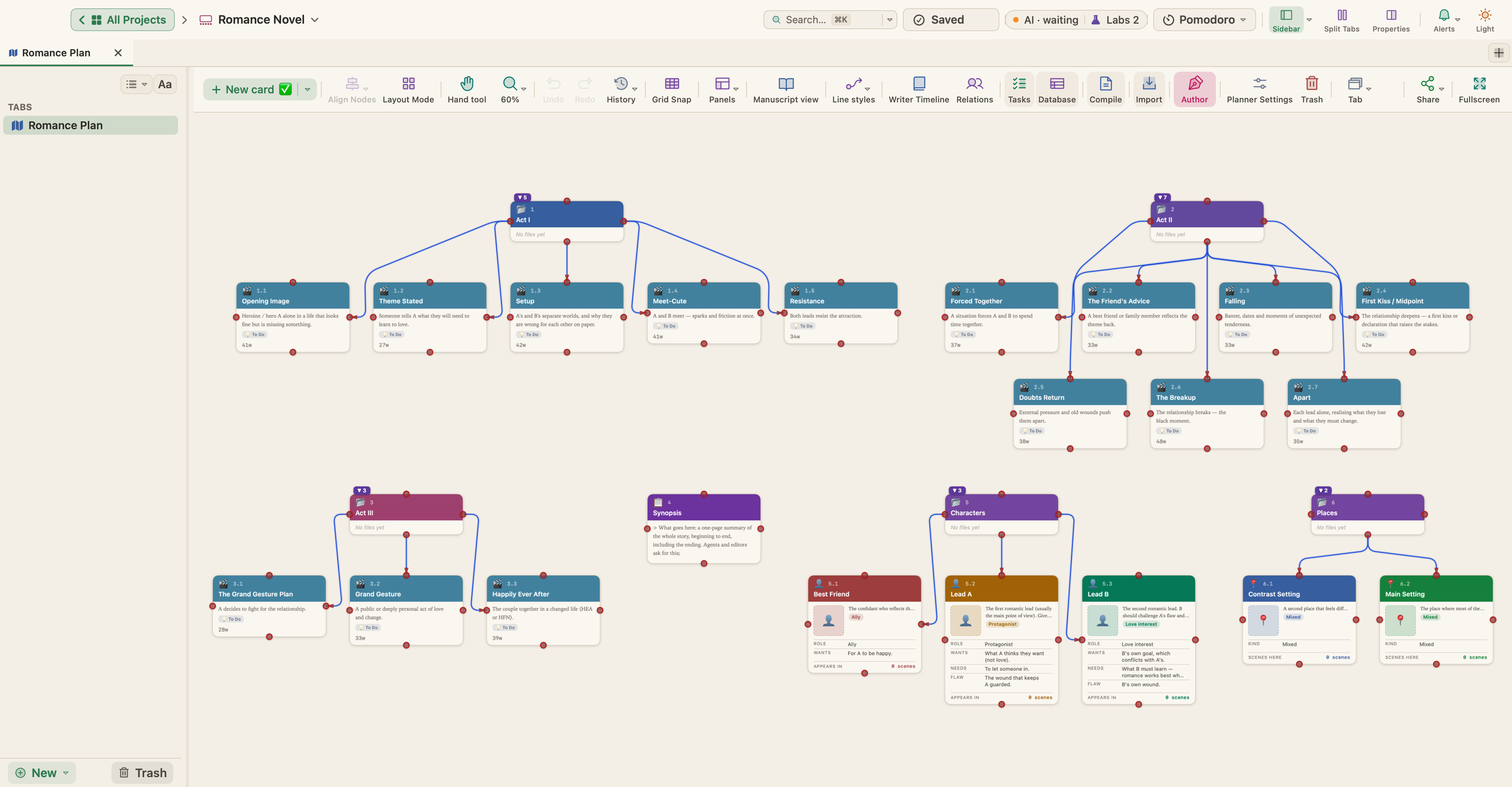
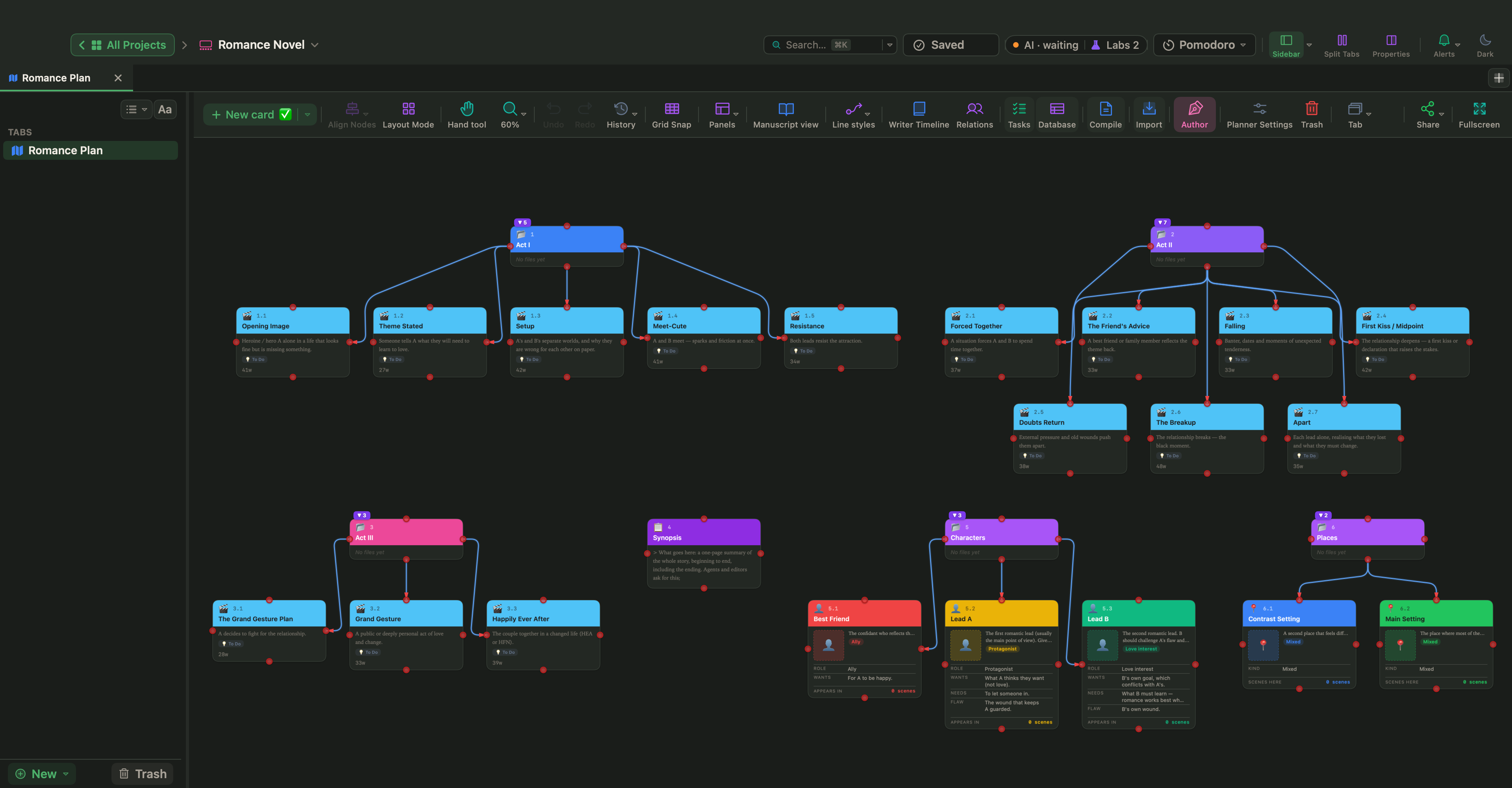
Choose File › New Project… (⇧⌘N), pick the Fiction category, select Romance Novel and click Create…. The template lays a romance over the 15-Beat Structure in three acts. Every scene card has a beat and a target tension; these are the romance's turning points:
| Card | Beat | Target tension |
|---|---|---|
| Meet-Cute | Catalyst | 6 |
| Forced Together | Break into Two | 6 |
| First Kiss / Midpoint | Midpoint | 8 |
| The Breakup | All Is Lost | 9 |
| Grand Gesture | Finale | 10 |
| Happily Ever After | Final Image | 3 |
Each card also holds a synopsis, a What goes here note and Questions to answer; the card called The Breakup asks whether both leads are partly right. The template adds a Synopsis page, two places, a Best Friend and the two leads: Lead A, usually the main point of view, and Lead B, the love interest, with an arc of their own.
Give both leads a profile
Select the Lead A card and open View › Properties Panel (⌥⌘P). Its Character profile section has Role, Wants (external goal), Needs (inner truth), Flaw / wound and Arc, and the template fills in a starting want, need and flaw for each lead. Under Relationships, click + Relationship to link the leads with a kind such as Partner or Rival.
Follow both leads through the book
Open View › Writer Timeline (⌥⌘T); fiction templates turn on the Author mode it needs. On the Plot Board, the Plotline button adds a plotline and a double-click renames it, so the love story and the external plot can run in lanes of their own. The Cast section of a scene's properties sets its POV characters, and the Story Map can show POV as its rows, so you can see whether the leads take turns. The Tension panel draws the curve from each scene's rating, 1 to 10, so the template's targets give you a shape before you write.
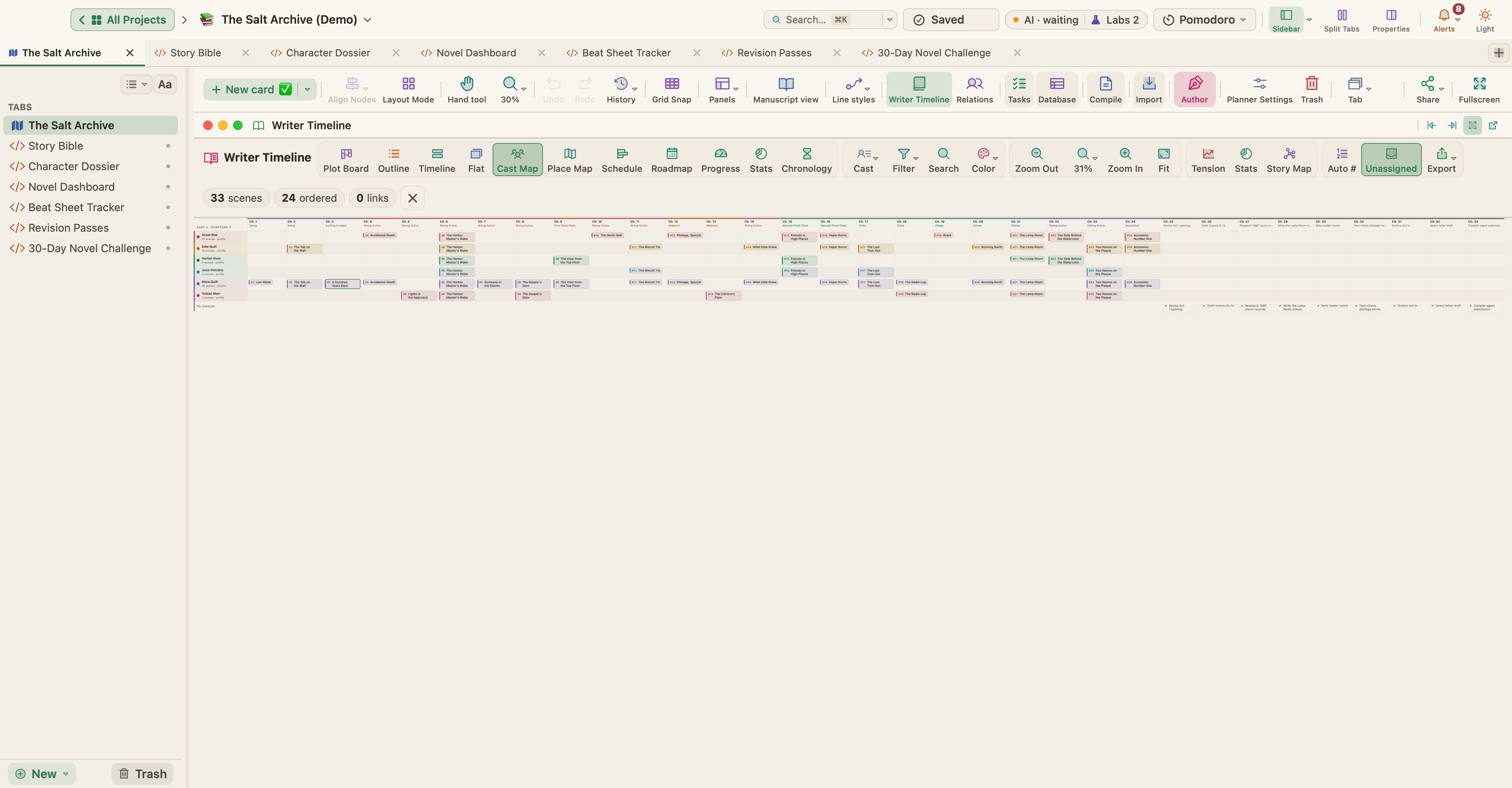
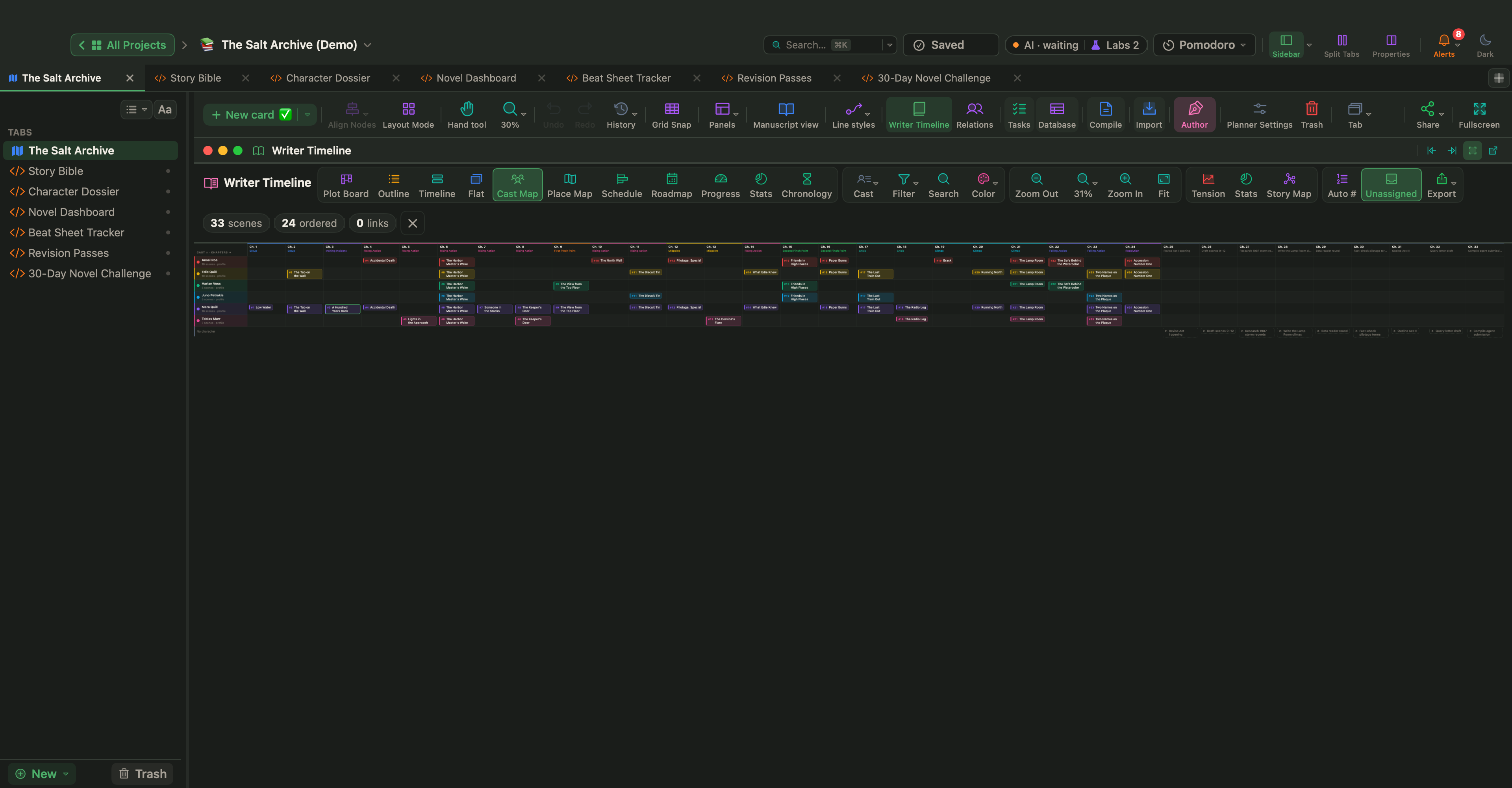
The Cast Map sets characters against chapters. In The Salt Archive, a sample mystery, the detective sergeant Ansel Roe is listed as ally and love interest. His first scenes, in chapters 4 and 6, are shared with Mara Quill. A late entrance can work in a subplot; in a romance, the leads meet at the Catalyst, the template's fourth card.
Relationship Net (Labs)
Live Pages are a Labs feature. Turn on Turn HTML pages into small apps (Live Pages) in Settings › Labs, then choose New ▾ › Live Page ▸ › Examples ▸ in the sidebar. In the Fiction submenu, Relationship Net draws a network of your characters from card connections, relation fields and shared scenes. See Live Pages.
For a finished love story to study, open Pride & Prejudice from Help › Demo Projects: the complete public-domain novel.
Decide the ending you promise, give each lead a want, a need and a wound the other one tests, and plan the big beats as cards. Moving a kiss two chapters later is easy on a card and much harder in a finished manuscript.